Standalone Windows intercom station
Talk to one panelist. The room hears nothing.
ZComms is a talkback and IFB station for productions that run on Zoom. The panel is a grid of keys, and a key wears a person's name — hold it and your voice lands in that person's ear alone, while the meeting floor, the recording, and everyone else carry on unaware. It rides the Zoom Meeting SDK's own talkback channels: no virtual audio cable, no second machine, no bot account.
How a key reaches one ear
Zoom's Meeting SDK carries a talkback path alongside the meeting floor: up to 16 channels, each holding up to 10 people, addressed independently of the room. ZComms provisions the whole bank once when it joins and then assigns people to it — keying selects a channel, it never tears one down and rebuilds it. Your voice goes down the channel you keyed and nowhere else; the meeting mic stays open, because Zoom requires an open mic to deliver talkback at all, but it is fed nothing, so the room stays silent. That is a pure SDK arrangement — no audio driver is installed and no loopback device is created.
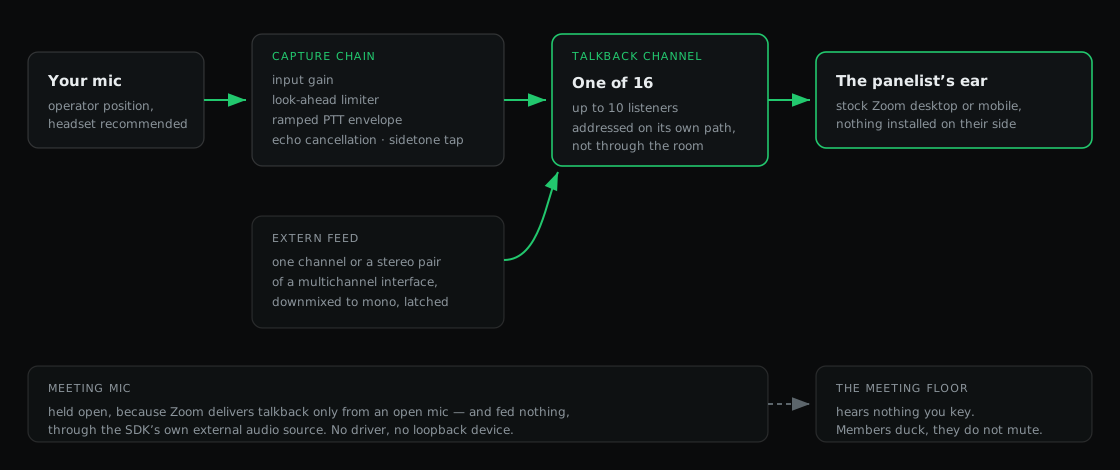
Members of the channel you key are ducked rather than muted: their meeting audio drops under your voice and comes back to unity the moment you release, so talent never loses the room. The duck is gated on the signal actually present, not on the state of the key — a latched extern feed that happens to be silent leaves the room at full level.
What is on the panel
Keys and the grid
- One cell per talkback-capable participant, carrying their Zoom name
- Hold to talk, latch to stick, and LATCH ALL for a standing open line
- ALL CALL across every provisioned channel in one press
- Numbered slots for direct keys, reassignable from the panel
Channels and privacy
- 16 talkback channels, up to 10 listeners each, provisioned in one pass
- Channel isolation verified live — a listener on one channel hears nothing from another
- Members ducked while you key and returned to unity on release
- The meeting mic held open but fed nothing, and re-asserted as housekeeping
Extern feeds
- Any channel or stereo pair of a multichannel interface, latched into a channel
- Per-feed gain and limiter, downmixed to mono because SDK sends are mono-only
- Input meter reading −60 to 0 dBFS across 12 segments, pre-envelope and post-gain
- The −50 dBFS signal gate drawn on the scale, so "present" and "counts as signal" are distinguishable
- Feeds persist across launches
Capture chain
- Input gain, look-ahead limiter, then a ramped PTT envelope — edges ramp, they do not gate
- Echo cancellation referenced against ZComms' own monitor output, defeatable
- Sidetone tapped after the envelope, so it monitors what is actually being sent
- Device pickers that switch live, plus a built-in test tone
Breakout rooms
- Zoom talkback cannot cross breakout rooms — the panel says so rather than failing quietly
- Cells for people in another room go dark, name the room, and refuse the press
- The station can move itself between rooms from Settings
- Chat used as a signalling side-channel for cues and notifications
Joining and control
- Sign in with Zoom once through the browser (PKCE) — every join happens as your account
- Paste any meeting link or ID; no bot account and nothing for panelists to install
- The panel is served on
127.0.0.1:7350with an SSE state stream - A one-line action API on the same port — the seam a Stream Deck or Companion module drives
What it needs
- Windows 10 or Windows 11 (x64). The installer is per-user and needs no administrator rights; the Zoom Meeting SDK ships inside it. There is no macOS build yet.
- A Zoom account you can sign in with. ZComms joins as you, through the same OAuth broker CoreVideo uses. There are no anonymous joins.
- Panelists on a native Zoom client, desktop or mobile, with nothing installed on their side. The Zoom web client cannot receive talkback at all — the panel labels those people rather than pretending the key works.
- A headset on the operator position is still best practice, echo cancellation notwithstanding.
Early software, honestly
ZComms is at v0.1.14 and is early. Talkback delivery, channel isolation, the duck behaviour, and breakout awareness have all been verified in real meetings. Extern feeds have not yet been proven in a live meeting — they are covered by unit tests and bench-verified against real hardware, but the in-meeting gates are still open. Expect rough edges, and please report them on the issue tracker.
The build is not code-signed, so Windows SmartScreen warns the first time you run the installer — "More info", then "Run anyway". Signing is waiting on a developer account, not on a decision.
Where it fits
ZComms and CoreVideo are separate products that came out of the same problem — running a real show inside somebody else's Zoom meeting — and they share the Zoom Meeting SDK and the same sign-in broker. ZComms is the standalone desk: it is what you run when the intercom is the job, on its own machine or beside a switcher that has nothing to do with Zoom.
The CoreVideo plugin includes a Zoom Talkback dock on Windows (v0.1.45 and later), for operators keying talent from OBS. macOS talkback is unavailable. ZComms provides a separate operator position and feeds from a larger comms system.
| Product | Form factor | Talkback |
|---|---|---|
| ZComms | Standalone Windows app | The whole product — a full desk, extern feeds, and its own operator position. Shipping now. |
| CoreVideo for OBS | OBS Studio plugin | An intercom dock beside the video routing, for the operator already cutting the show. In development, unreleased. |