In development · standalone studio
Produce polished live conversations from your Zoom calls.
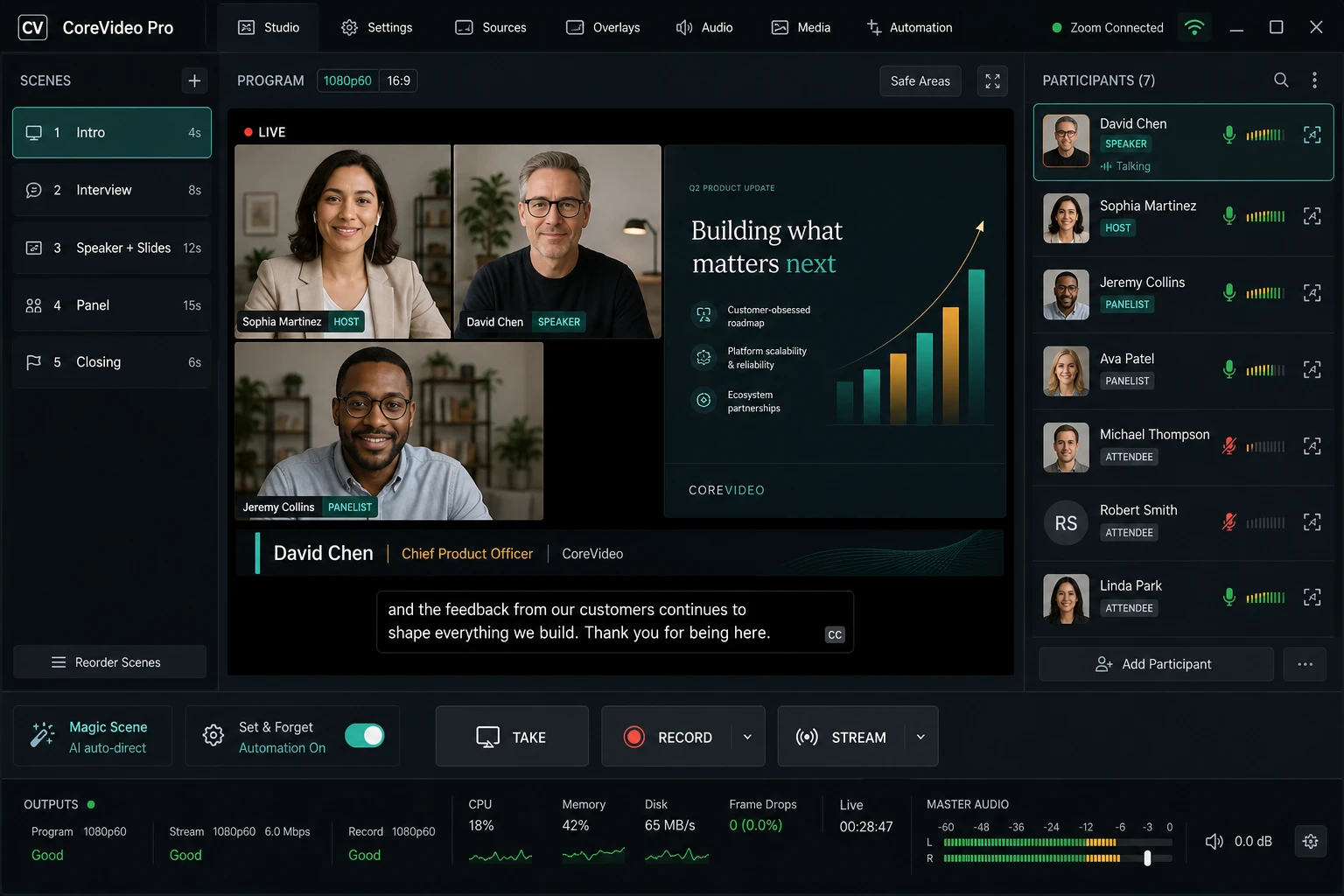
CoreVideo Pro is the premium, all-in-one studio being built for live Zoom production: everything the CoreVideo plugin captures, plus multi-scene production, participant management, recording and multi-destination streaming, and an AI auto-director — in one standalone app for producers who want a dedicated console rather than a plugin.
Pro is not released yet. There is no download and no price. This page and the architecture notes describe what is being built; the free OBS plugin is the shipping product today, and ZComms is the shipping talkback desk.
The complete production studio
Pro is designed as a Zoom-native studio for Windows and macOS. Everything below is the capability set the product is being built toward — a target, not an inventory of what runs today. Individual items land, and get announced, one at a time.
Zoom capture & media core
- True Zoom Meeting SDK raw video and audio — no window or virtual-camera hacks
- Clean per-participant video, audio, and screen-share capture
- GPU compositor (Direct3D on Windows, Metal on macOS)
- Isolated capture process, automatic reconnect, and webinar mode
Scenes, templates & switching
- One-click professional templates: solo, interview, panel, screen-share, webinar
- Grid, speaker-focus, and picture-in-picture layouts with slot rules
- Program/preview workflow with explicit Take and Cut/Fade/Slide transitions
- Save and reload complete show presets
AI direction
- Magic Scene builds a ready-to-stream show from the live call
- Set & Forget auto-director switches on active speaker and screen share
- Role-aware logic — host for intros, presenter for shares, speaker for discussion
- Manual overrides always win, with one click back to auto
Participants & framing
- Every participant treated as a production-ready source, not a raw feed
- Face-aware auto-crop, centering, and manual zoom override
- Speaker holds to prevent rapid cutting, with graceful video-drop fallback
- Stable Host / Presenter / Panelist / Guest role overrides
Audio
- Per-participant gain with smart auto-leveling and manual trim
- Per-source noise suppression, mute, and solo
- Master meter with limiter and clipping warnings
- A/V sync offset for local capture sources
Graphics, captions & branding
- Auto lower-thirds from Zoom name and role, with manual override
- Real-time program captions with speaker-name attribution
- Brand kit — logo, color, font, background — applied automatically
- Brand bug, banners, call-to-action overlays, and per-source chroma key
Local cameras (Blackmagic & AJA)
- Auto-detect DeckLink/UltraStudio and AJA Io/Kona, with hot-plug
- SDI/HDMI input selection with embedded or separate audio
- Local cameras as first-class sources, fillable into any slot
- Sub-100ms preview latency with signal-health monitoring
Recording & streaming
- Local MP4/MOV recording up to 4K at 30/60fps
- Multi-destination RTMP/NDI/SRT with YouTube, Twitch, and custom presets
- Per-participant ISO recording for clean guest capture
- Hardware encoding (NVENC, Quick Sync, AMF, VideoToolbox) with output preflight
Which one do I use?
Already run your shows in OBS? The free OBS plugin brings clean Zoom participants in as native sources, and it is available today. Need to talk to one person without talking to the room? ZComms is the standalone talkback desk, also available today. CoreVideo Pro is the dedicated console being built on the same capture core — when it is ready to install, it will be on this page with a download button, not a paragraph.
| Tier | Form factor | Best for |
|---|---|---|
| CoreVideo — Free, available now | OBS Studio plugin | Operators already running shows in OBS who want clean Zoom participants as native sources, ISO recording, an Active Speaker Director, and Stream Deck control. |
| ZComms — Available now | Standalone Windows app | Productions that need talkback: named keys into Zoom's private talkback channels, with its own operator position. See ZComms. |
| CoreVideo Pro — In development | Standalone app | Producers who want a dedicated studio — scenes, participants, outputs, recording, and AI auto-direct in one app. Not yet released. |